More power for your
customers. More bandwidth for your team.
More power for your customers. More bandwidth
for your team.
More power for your customers. More bandwidth
for your team.
Your customers don't want to call you to check an invoice, ask about a pickup, or update a payment method. And your team doesn't always have time to answer those calls. The Haulvana Customer Center gives every account 24/7 access to everything they need.
Your customers don't want to call you to check an invoice, ask about a pickup, or update a payment method. And your team doesn't always have time to answer those calls. The Haulvana Customer Center gives every account 24/7 access to everything they need.

Everything customers need to manage their
account, on their schedule
Everything customers need to manage their
account, on their schedule
Everything customers need to manage their
account, on their schedule
The customer center covers everything your customers call about most, so your team handles exceptions, not explanations.
Pay a bill in seconds, from anywhere
Everything a driver needs and nothing more.
Customers open their portal, see their current balance, and pay with a saved card or a new one. For recurring customers, autopay handles it entirely*: payment goes out on schedule, confirmation lands in their inbox, and your AR stays clean without anyone following up.
Customers open their portal, see their current balance, and pay with a saved card or a new one. For recurring customers, autopay handles it entirely*: payment goes out on schedule, confirmation lands in their inbox, and your AR stays clean without anyone following up.
Customers open their portal, see their current balance, and pay with a saved card or a new one. For recurring customers, autopay handles it entirely*: payment goes out on schedule, confirmation lands in their inbox, and your AR stays clean without anyone following up.

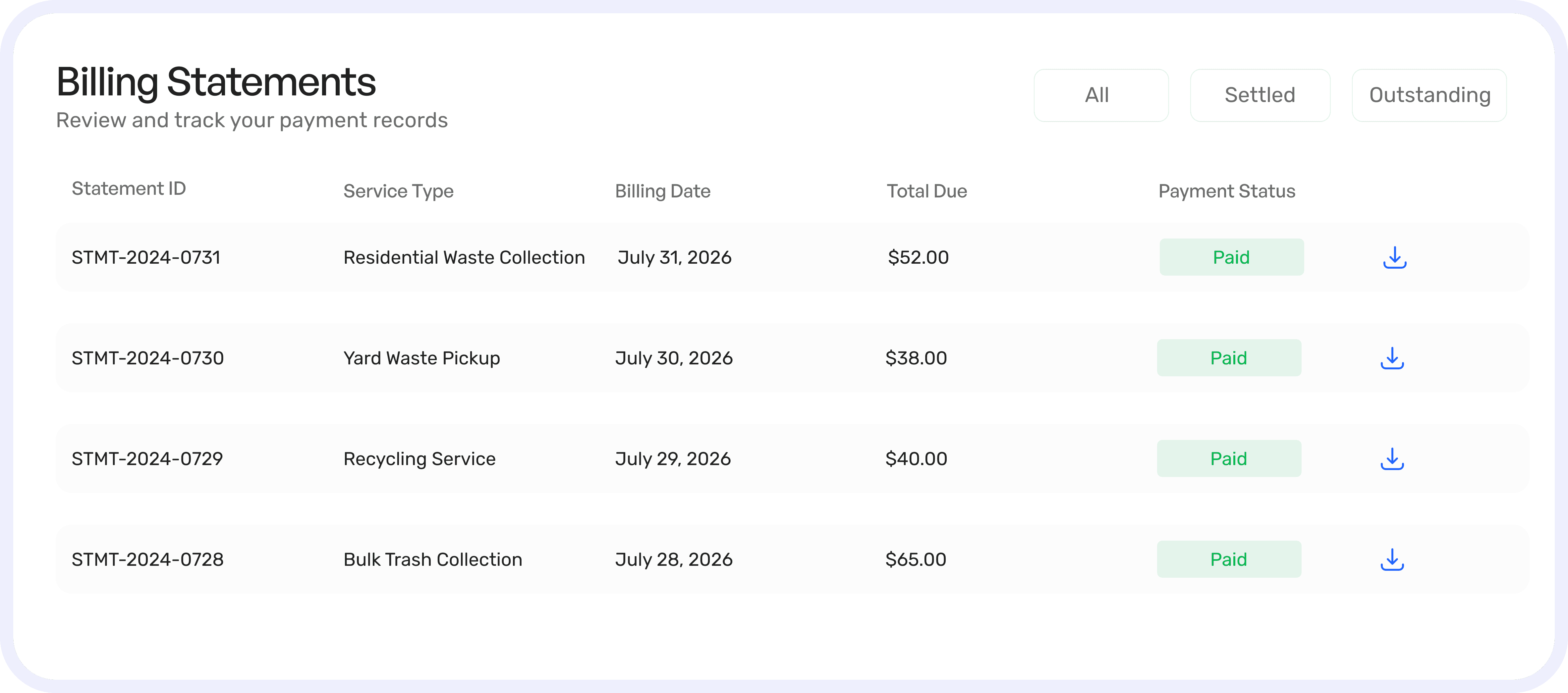
Every invoice, statement, and receipt is always at hand
Customers can review current and past invoices, download PDF statements, and see a full payment history without emailing your office. When a customer questions a charge, they have everything they need to see exactly what was billed and when.
Customers can review current and past invoices, download PDF statements, and see a full payment history without emailing your office. When a customer questions a charge, they have everything they need to see exactly what was billed and when.
Verification that tells a full story
Every completed service includes timestamped photos captured by the driver. Customers can see exactly what was done, when, and in what condition. For disputes, the photos speak for themselves. Your team spends less time defending service calls and more time on actual work.
Every completed service includes timestamped photos captured by the driver. Customers can see exactly what was done, when, and in what condition. For disputes, the photos speak for themselves. Your team spends less time defending service calls and more time on actual work.
Every completed service includes timestamped photos captured by the driver. Customers can see exactly what was done, when, and in what condition. For disputes, the photos speak for themselves. Your team spends less time defending service calls and more time on actual work.


Service requests that go straight to your team
Dispatch stays in the loop without the phone calls.
Customers submit requests directly through the portal, be it a swap, an extra pickup, a schedule change. The request flows into your dispatch workflow immediately, without passing through a phone call or an inbox. Your team sees it, approves it, and assigns it. The customer gets a confirmation. Just the way it should be.
Customers submit requests directly through the portal, be it a swap, an extra pickup, a schedule change. The request flows into your dispatch workflow immediately, without passing through a phone call or an inbox. Your team sees it, approves it, and assigns it. The customer gets a confirmation. Just the way it should be.
Customers submit requests directly through the portal, be it a swap, an extra pickup, a schedule change. The request flows into your dispatch workflow immediately, without passing through a phone call or an inbox. Your team sees it, approves it, and assigns it. The customer gets a confirmation. Just the way it should be.
Upcoming pickups and rental status are readily visible
Residential customers see their scheduled pickups before they happen, so they’re never caught off guard. RORO customers track active rentals, see rental period details, and know what’s coming on their next invoice. Fewer "when is my pickup?" calls. Fewer "why was I charged this?" conversations.
Residential customers see their scheduled pickups before they happen, so they’re never caught off guard. RORO customers track active rentals, see rental period details, and know what’s coming on their next invoice. Fewer "when is my pickup?" calls. Fewer "why was I charged this?" conversations.
Residential customers see their scheduled pickups before they happen, so they’re never caught off guard. RORO customers track active rentals, see rental period details, and know what’s coming on their next invoice. Fewer "when is my pickup?" calls. Fewer "why was I charged this?" conversations.


Proactive notifications that keep customers informed
The portal sends automated alerts so customers always know what’s happening with their account. When customers feel informed, they’re less likely to call, less likely to dispute, and more likely to pay on time.
The portal sends automated alerts so customers always know what’s happening with their account. When customers feel informed, they’re less likely to call, less likely to dispute, and more likely to pay on time.
The portal sends automated alerts so customers always know what’s happening with their account. When customers feel informed, they’re less likely to call, less likely to dispute, and more likely to pay on time.
Easy to launch. Easy for
customers to use.
Easy to launch. Easy for customers to use.
Easy to launch. Easy for customers to use.
Your team can set up the Customer Center quickly without a complex rollout. Once it’s live, customers can create accounts, add payment details, and start using services right away. Your team steps in only when needed, not for every setup.
Your team can set up the Customer Center quickly without a complex rollout. Once it’s live, customers can create accounts, add payment details, and start using services right away. Your team steps in only when needed, not for every setup.
01
Quick setup
Quick setup
Quick setup
Your team configures the portal in minutes, brand it, connect it, and it's live.
Your team configures the portal in minutes, brand it, connect it, and it's live.
Your team configures the portal in minutes, brand it, connect it, and it's live.
→
→
02
Customers onboard
Customers onboard
Customers onboard
Customers create their own accounts, add payment details, and explore their portal.
Customers create their own accounts, add payment details, and explore their portal.
Customers create their own accounts, add payment details, and explore their portal.
→
→
03
Self-serve daily
Self-serve daily
Self-serve daily
Invoices, pickups, requests, and photos all managed without calling your office.
Invoices, pickups, requests, and photos all managed without calling your office.
Invoices, pickups, requests, and photos all managed without calling your office.
→
→
04
Team handles exceptions
Team handles exceptions
Team handles exceptions
Approvals and edge cases only, your team focuses on the work that actually needs them.
Approvals and edge cases only, your team focuses on the work that actually needs them.
Approvals and edge cases only, your team focuses on the work that actually needs them.
Your customers see your brand, not a software company's.
Your customers see your brand, not a software company's.
Your customers see your brand, not a software company's.
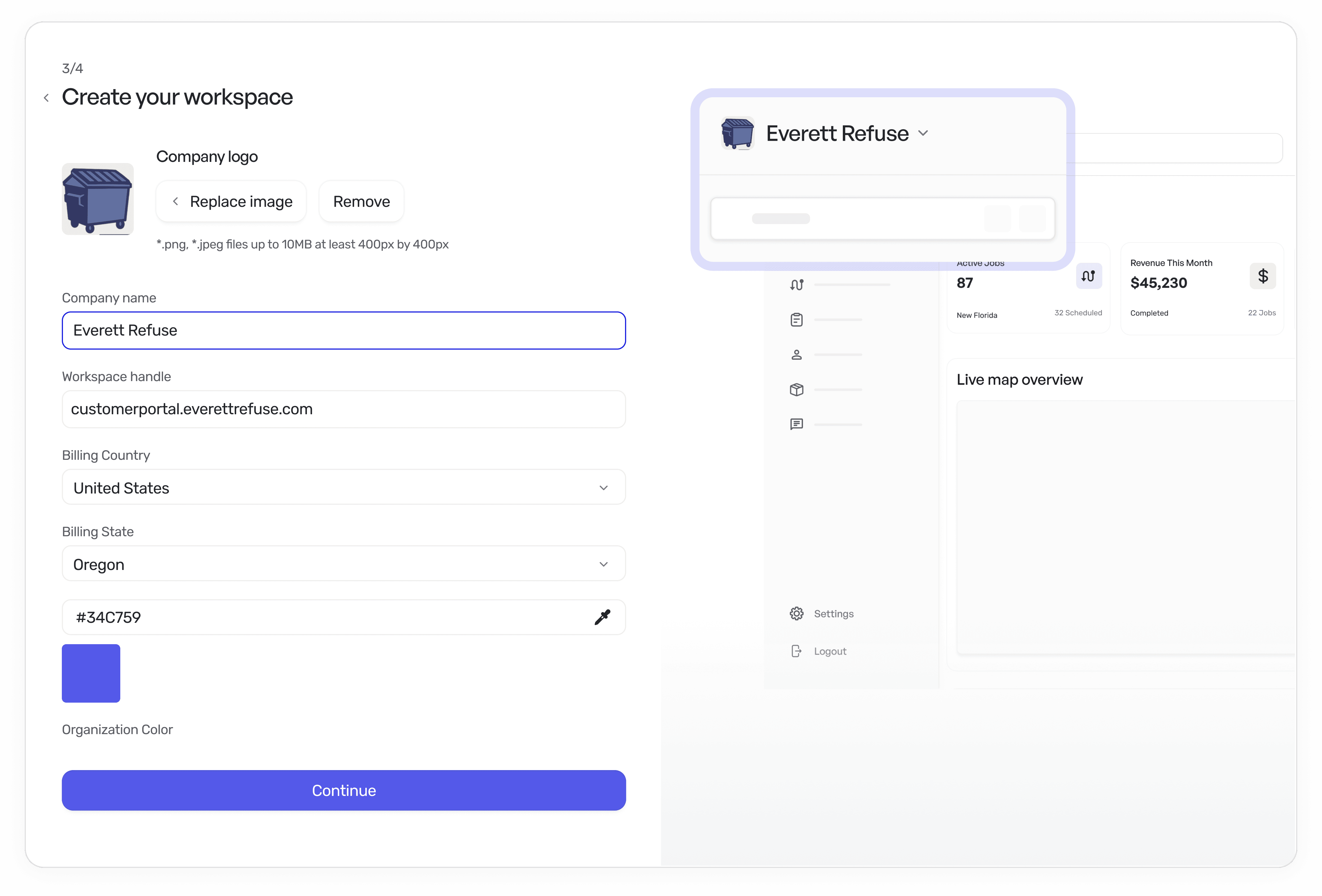
The portal your customers use carries your logo, your colors, your domain and your company name, not ours. To them, it's a seamless extension of your business. To you, it's a professional edge that builds trust, reduces confusion, and positions your operation as the modern hauler in your market.
The portal your customers use carries your logo, your colors, your domain and your company name, not ours. To them, it's a seamless extension of your business. To you, it's a professional edge that builds trust, reduces confusion, and positions your operation as the modern hauler in your market.
Transparency, convenience, and control For every customer and for your team
Transparency, convenience, and control For every customer and for your team

The next-generation operating system for the waste industry
The next-generation operating system for the waste industry
The next-generation operating system for the waste industry
The next-generation operating system for the waste industry